The Gathered Dress is a relaxed, sleeveless dress finished with bias binding. This dress is designed to have the gathers sit above your natural waist, with a generously gathered skirt for ease and movement, plus inseam pockets of course. Perfect for summer.
THIS IS A DIGITAL PDF SEWING PATTERN. YOUR FILE WILL BE EMAILED TO YOU AFTER YOUR PURCHASE.
Fabric
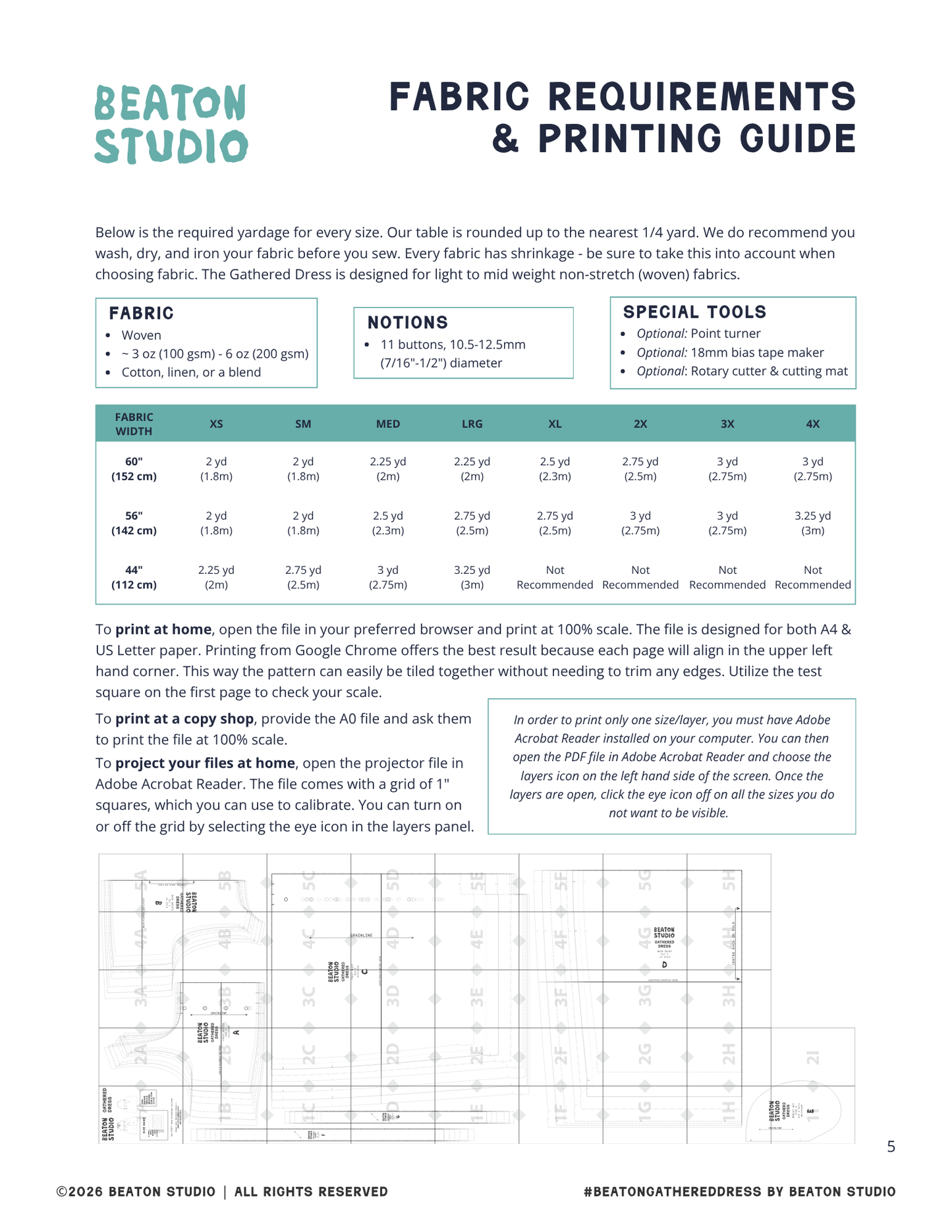
Beaton patterns work best in light to mid weight non-stretch (woven) fabrics. For the Gathered Dress, if you choose anything greater than 6 oz (200 gsm), you will need to account for extra bulk with gathering & bias bound finishes. It is not recommended to go beyond 8 oz (270 gsm). See our yardage chart in the final image.
Size & Fit
- woven
- ~ 3 oz (100 gsm) - 6 oz (200 gsm)
- 100% cotton
- 100% linen
- cotton/linen blend
FABRIC CONSUMPTION
*See Final Image
Notions & Special Tools
NOTIONS
- Matching thread
- 11 Buttons: 10.5-12.5mm (7/16"-1/2") diameter
SPECIAL TOOLS
- Optional: Point turner
- Optional: 18mm bias tape maker
- Optional: Rotary cutter & cutting mat
Size & Fit
BEATON's sizing is relaxed, slightly oversized, but true to the size guide. Our patterns are drafted for an average height of 170cm (5'7"). To ensure your best fit, take your body measurements carefully and compare to our sizing chart. The bust is the most important measurement for the Gathered Dress.
See second last image for detailed sizing information.
PDF Printing
To print at home, open the file in your preferred browser and print at 100% scale. The file is designed for both A4 & US Letter paper. Printing from Google Chrome offers the best result because each page will align in the upper left hand corner. This way the pattern can easily be tiled together without needing to trim any edges. Utilize the test square on the first page to check your scale.
To print at a copy shop, give the A0 file to the staff via email or on a usb flash drive. Ask them to print the file at 100% scale.
To project your files at home, open the projector file in Adobe Acrobat Reader. The file comes with a grid of 1" squares, which you can use to calibrate. You can turn on or off the grid by selecting the eye icon in the layers panel.
This pattern comes layered, which means that you can turn off the sizes you do not need. In order to do this, you must have Adobe Acrobat Reader installed on your computer. You can then open the PDF file in Adobe Acrobat Reader and choose the layers icon on the left hand side of the screen. Once the layers are open, click the eye icon off on all the sizes you do not want to be visible.